Cre8Virals logoCre8Virals
SEO Strategy • 2026 Growth Blueprint

YouTube Hashtag Generator

10 min read
May 9, 2026
Ritesh Yadav
YouTube Hashtag Generator Blueprint

With millions of hours of content consumed daily, making your videos discoverable on YouTube requires optimization at every level. While title, description, and thumbnail optimization are well-known, one of the most underutilized traffic sources is YouTube's hashtag ecosystem. Clicking or searching a hashtag routes users to unique 'Hashtag Feed Pages' dedicated solely to that topic. In this 2026 guide, we'll explain how to leverage a YouTube hashtag generator, design structured semantic tag clusters, and show how Cre8Virals automates viral categorization to unlock explosive organic reach.

Most creators approach hashtags blindly. They either ignore them entirely, paste fifty highly generic hashtags (e.g., #viral, #trending, #video) that offer zero category definition, or stuff keywords to the point of triggering YouTube's strict spam parameters. This ruins their recommendation eligibility. To gain views in 2026, hashtags must be designed around **Search Intent Clustering** and a deep understanding of natural language categorization models.

This masterclass breaks down the math and taxonomy behind successful hashtag strategies. We will detail the 3-tier hashtag framework, outline the strict boundaries of the recommendation algorithms, and show how Cre8Virals' smart semantic hashtag workspace takes the guesswork out of video metadata to index your channel for long-term growth.


1. The 3-Tier Hashtag Clustering Framework

The Science of Semantic Categorization

A successful hashtag selection strategy requires structure. Instead of throwing random trending words at your description, you must organize your hashtags into a hierarchical three-tier framework. This clustering allows YouTube's candidate generation filters to identify both your broad industry category and your video's specific micro-target:

Tier 1: Broad Niche

Defines your high-level industry or category. Maps your channel to massive audience cohorts.
Example: #fitness, #coding, #cooking

Tier 2: Core Topic

Targets the specific subject of the upload, connecting you to viewers looking for this type of content.
Example: #homeworkout, #python, #veganrecipes

Tier 3: Micro-Niche

Funnels down to the unique value, tutorial variant, or target benefit of your video.
Example: #kettlebell, #pandas, #vegandessert

By feeding this balanced 3-tier classification to YouTube's search and suggest algorithms, you eliminate index ambiguity. The platform instantly understands who your target seed audience is, which dramatically improves initial watch feedback scores.

Algorithmic Index Hierarchy

Hashtag Semantic Clustering

Visual representation of how Cre8Virals groups target hashtag suggestions to balance massive niche discoverability against low-competition search rankings.

TIER 1: BROAD NICHE (#coding)TIER 2: CORE TOPIC (#python)#pandas

Figure 1: The semantic cluster model. Isolating broad categories while targeting exact, hyper-relevant micro-tags allows for optimal index ranking.

2. Under the Hood: Cre8Virals AI Hashtag Engineering

Optimizing suggested feed pipelines

Most hashtag tools simply search a database and return a list of terms ordered by raw volume. But selecting hashtags based on volume alone is a recipe for failure; you end up competing with millions of massive channels, and your video gets buried.

Cre8Virals approaches hashtag optimization mathematically. Our multi-layer suite processes trending video datasets continuously. Here is exactly how our platform engineers viral hashtags:

01
Live Search Volume Scraper

Our algorithms gather real-time data from YouTube search engines and autocomplete APIs. Instead of utilizing historical databases, Cre8Virals measures active query volume changes to capture sudden search trends and emerging topics before the niche becomes saturated.

02
Competitor Outlier Cross-Referencing

Cre8Virals identifies the breakout outlier videos in your exact niche. It scans the metadata profiles of uploads that are vastly outperforming their channel's subscriber baselines, extracts the hashtags driving their suggested traffic, and maps them to your video workspace.

03
Semantic Intent Clustering Models

Using Latent Dirichlet Allocation (LDA) and natural language semantic models, Cre8Virals automatically clusters recommended hashtags into the structured 3-tier hierarchy (Broad, Core, Micro), balancing massive discoverability with targeted low-competition reach.

Niche Comparison

Manual Tags vs. Standard Generators vs. Cre8Virals

An evaluation of how different optimization methods affect category indexing, competitive density, and long-term search placement.

CapabilityManual TaggingBasic Tag SpinnersCre8Virals Engine
Hierarchy MappingNone. Guesswork.No structure. Suggests the largest tags blindly.Automated. Arranges terms in a balanced 3-tier hierarchy.
Outlier Performance ScrapingNone. Reliant on personal research.None. Relies on static historic search databases.Active. Cross-references live outlier performance indicators.
Algorithmic Spam ProtectionLow. High risk of keyword stuffing.None. Recommends up to 50+ keywords, risking shadowbans.Built-in. Restricts output to the optimal 3-5 high-relevance tags.

3. Step-by-Step: Leveraging the Cre8Virals Hashtag Suite

From Video Topic to Optimized Description Placement

Cre8Virals integrates hashtag engineering directly into your metadata workspace. Let's walk through how our tool guides you to generate and deploy highly optimized hashtags in three simple steps:

01Step 1: Input Video Topic & Concept

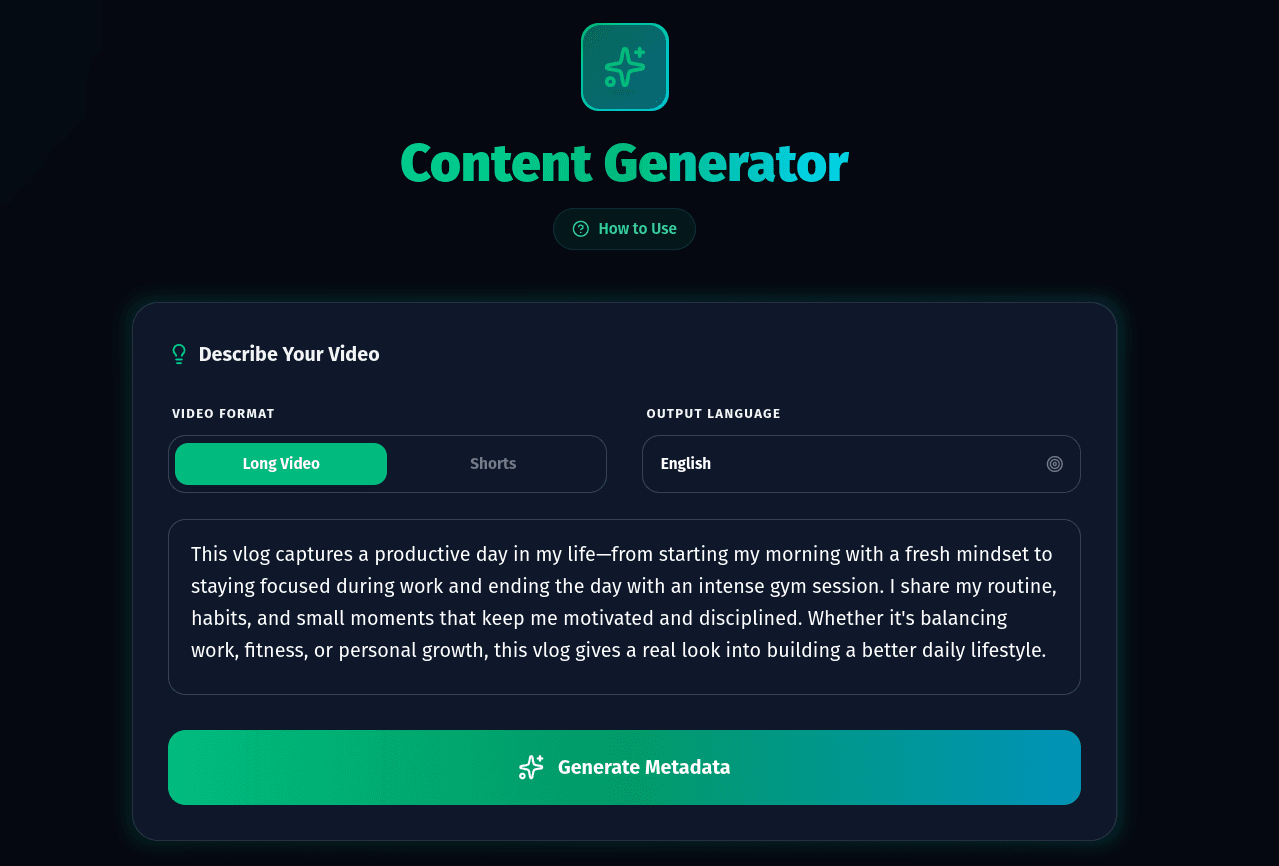
Start by navigating to the Cre8Virals Content Generator. Choose your upload format (Long-form or Shorts) and describe your video's core concept in our unified input workspace. Our semantic parser reads your raw description to isolate your broad niche, core theme, and micro-target points.

Cre8Virals Workspace Concept Input

Figure 2: Entering video concept specifications into the Cre8Virals unified creator console.

02Step 2: Generate Algorithmic Metadata

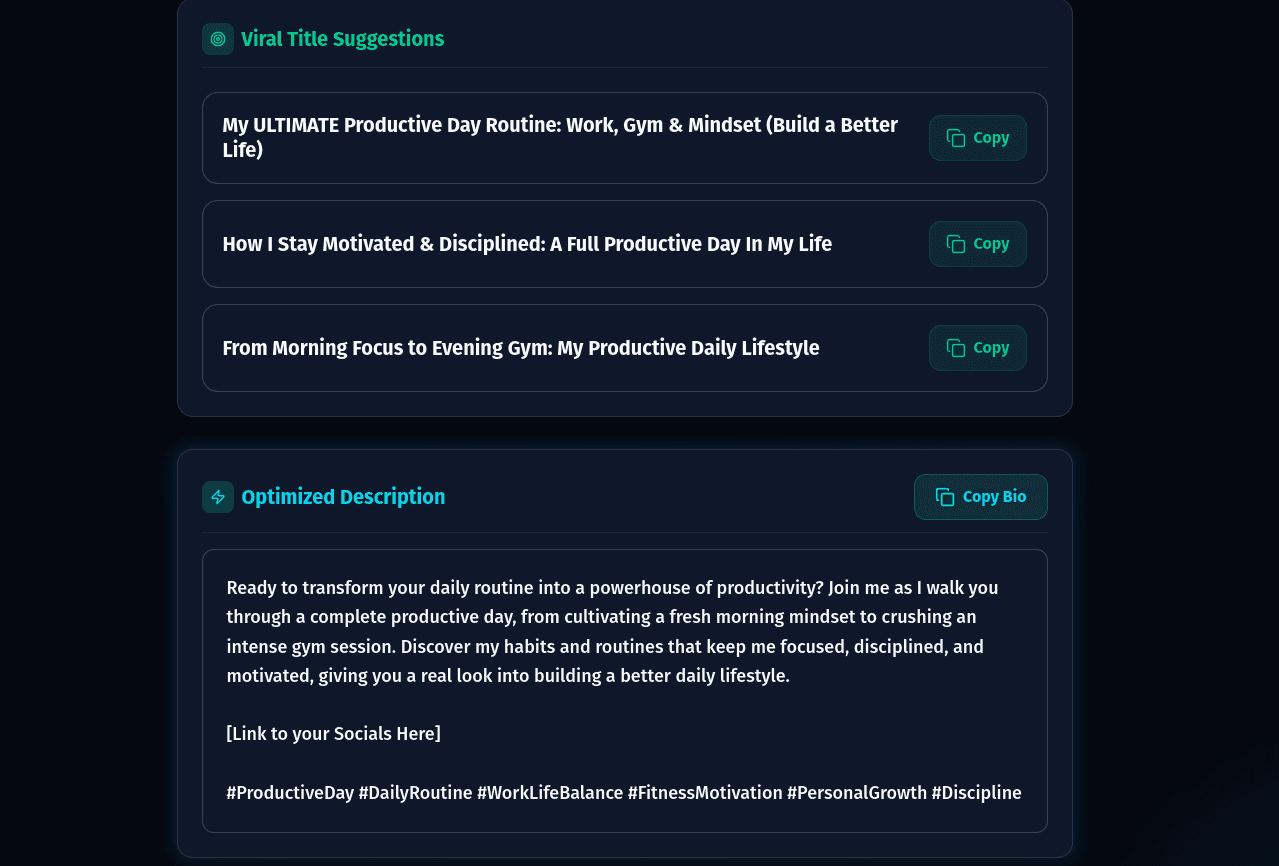
Click the Generate Metadata button to activate our prediction algorithms. Cre8Virals instantly outputs a list of structured title suggestions, high-relevance descriptions, and optimized semantic tags tailored specifically to target active search queues in your niche.

Cre8Virals Metadata Output Screen

Figure 3: Structured title variations, descriptions, and high-performance tag predictions calculated by our models.

03Step 3: Deploy Smart Categorized Tag Mapping

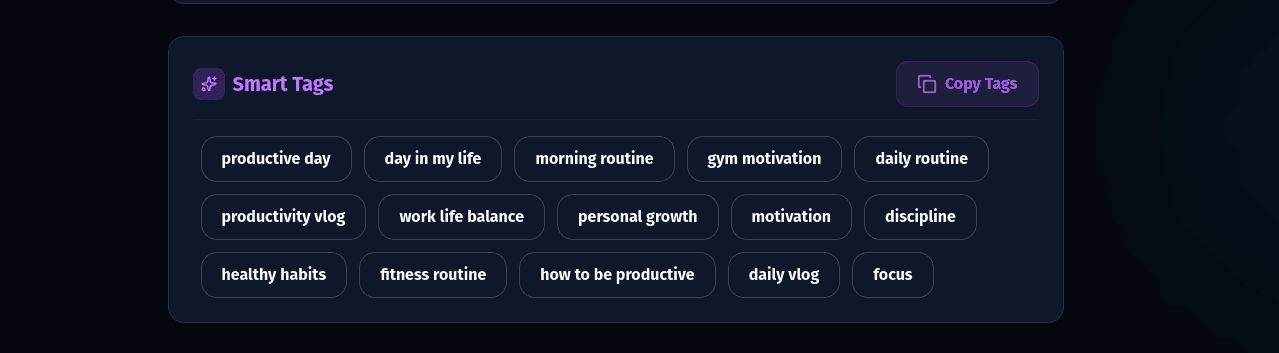
The final step maps out highly relevant Action, Category, and Benefit tags. By grouping recommended tags into structured queues, Cre8Virals feeds YouTube's explore and recommendation filters, ensuring your video ranks and aligns with the correct suggested traffic cohorts.

Cre8Virals Semantic Tag Clustering Dashboard

Figure 4: The semantic tags dashboard showing Action, Category, and Benefit tags structured for easy deployment.

4. Professional Hashtag Best Practices

The Rules of High-Yield Tag Deployment

To maximize the organic traffic driven by your structured hashtags, ensure your deployment workflow complies with these professional search guidelines:

Rule 1: Placement Strategies

Always place your primary 3-5 hashtags near the very bottom of your video description. When you do this, YouTube's interface automatically extracts the first three hashtags and displays them in a highlighted slot above your video title. Do not clutter your title with hashtags.

Rule 2: Respect the 60-Hashtag Limit

YouTube has a strict policy regarding hashtag stuffing. If a video's description contains more than 60 hashtags, the platform ignores all hashtags on that video and may flag your channel for spam. Keep it clean, highly target-focused, and restricted to the optimal 3-5 hashtags.

Rule 3: Keep it Concept-Consistent

Do not use unrelated trending hashtags just to hijack general search spikes (e.g. putting #gaming on a beauty vlog). This creates severe cognitive friction for YouTube's recommendation filters, resulting in poor seed audience testing and a major drop in browse placements.

Stop Guessing.
Start Engineering Viral Metadata.

Reframe your metadata strategy with a unified creator workspace. Generate high-CTR titles, optimized descriptions, and semantically clustered hashtags backed by predictive AI.

Frequently Asked Questions

Q:How do hashtags differ from standard metadata tags on YouTube?

A:

Hashtags and standard tags serve two completely different discovery paths. Standard tags are hidden in your video's HTML code and primarily help YouTube's natural language models resolve spelling errors or map semantic themes internally. Hashtags, on the other hand, are fully visible to viewers in the description and above the video title. More importantly, hashtags act as clickable links that lead viewers directly to dedicated 'Hashtag Feed Pages' displaying all videos sharing that hashtag. Optimizing your hashtags can drive high-intent views from these isolated search feeds.

Q:What is the optimal number of hashtags to use on a YouTube video in 2026?

A:

The absolute sweet spot is between 3 and 5 hashtags. While YouTube allows you to place hashtags in your description, using more than 60 hashtags will trigger their automated spam filters, causing YouTube to ignore every single hashtag on your video and potentially shadowban your upload. Cre8Virals recommends placing 3-5 highly relevant, structured hashtags in your description to ensure maximum visibility and compliance with community guidelines.

Q:Should I put hashtags in my video title or only in the description?

A:

For most videos, we recommend placing hashtags near the bottom of your description rather than in the title. When hashtags are placed in the description, YouTube's UI automatically extracts the first three hashtags and displays them in a prominent space right above your video title on desktop and mobile. Placing hashtags in the title itself uses up valuable title character space (which is limited to 100 characters and truncated at 60 characters), causing unnecessary mobile visual clutter.

Q:How does the Cre8Virals Hashtag Generator find trending hashtags?

A:

Traditional hashtag generators rely on simple search-volume counters that suggest the most popular words. This results in heavy competition and minimal actual traffic. Cre8Virals utilizes a multi-dimensional semantic mapping engine. It continuously tracks the 'velocity' of rising outlier videos in your niche, maps search volume vs. keyword difficulty, and structures suggestions into a 3-tier hierarchy (Broad Niche, Core Topic, and Micro-Target) to optimize suggested feed routing.

Q:Can using the wrong hashtags hurt my video's algorithmic reach?

A:

Yes. YouTube's recommendation engine evaluates the semantic consistency of your video. If your video is about cooking but you use trending hashtags like '#gaming' or '#shorts' just to jump on a trend, the algorithm experiences cognitive friction. It will struggle to identify your target demographic, resulting in poor seed audience testing and a rapid drop in overall browse recommendations. Keeping your hashtags highly relevant and aligned with your actual content is vital.

Supercharge Your
YouTube Discovery Engine.

Try Cre8Virals today to generate high-performance titles, description tags, and semantically categorized hashtags designed to maximize browse recommendations.