
April 29, 2026•10 min read
YouTube Title Ideas 2026: The Psychology of High-CTR Metadata
Master the art of YouTube titles in 2026. Learn the 'Curiosity Gap' framework, semantic keyword optimization, and data-backed strategies to explode your CTR.

A viewer scrolling through YouTube makes a choice in less than 200 milliseconds. In that split-second interval, their eyes scan your thumbnail, evaluate its visual structure, and decide whether to stop or scroll past. This makes your thumbnail the ultimate gatekeeper of your channel's success. In this comprehensive guide, we will break down the design psychology that drives organic clicks, explore color clash rules, and show how advanced AI YouTube Thumbnail Generator simplifies high-CTR designing.
Most creators design thumbnails by opening a graphic editor, pasting a high-definition screenshot from their video, and layering paragraph summaries of their titles. This approach fails. It creates heavy cognitive load, making the design completely unreadable on tiny mobile screens where the vast majority of views occur.
To capture views, your layouts must satisfy the evolutionary pathways of the human eye. As thoroughly detailed in our specialized sister guide, Thumbnail Maker for YouTube Videos: The AI CTR Accelerator, dynamic graphic layouts must align visual assets with predictive cognitive paths. We will explore the Rule of Thirds, facial focus points, and color clash strategies. We will also detail how Cre8Virals' predictive thumbnail tools replace creative guesswork with pure design data, helping you dominate browse recommendation columns.
High-CTR visual concepts generated with zero Photoshop required—engineered specifically to beat YouTube's recommendation thresholds.



Want thumbnails that get millions of clicks?
Create Your ThumbnailThe Science of Scroll-Stopping Heuristics
A high-CTR thumbnail acts as a visual billboard. It doesn't tell the entire story; it introduces a hook that forces the brain to seek resolution by clicking. The most successful creators build their thumbnails using three foundational visual principles:
Human eyes are naturally drawn to faces. Zooming in on a single, high-contrast face showing intense emotion (wonder, fear, anger) triggers mirror neurons in the viewer's brain.
YouTube's UI is dark. To stand out, you must use opposing, highly saturated color pairs (like emerald green/pink or yellow/dark purple) that pop against dark feeds.
Keep designs simple. Limit your thumbnail to three visual anchors: a prominent face, a clashing background element, and 2-3 words of heavy, high-contrast text.
By coordinating these three visual rules, you ensure your design captures attention instantly and is fully readable even on the smallest mobile screens.
A visualization of how AI engines process thumbnail layouts. The AI maps candidate focus zones to predict where the viewer's gaze will land first.
Figure 1: Neural saliency mapping. AI tools analyze eye-tracking flow vectors to ensure key design elements are positioned on strategic focal intersections.
Inside our visual analysis engine
Most creators rely on generic templates, static layouts, or general AI model outputs (like Midjourney). While general AI image models can generate beautiful abstract art, they have no concept of mobile feed display rules, visual hierarchy, or YouTube click psychology.
Cre8Virals is built differently. Our engineering team has trained dedicated convolutional neural networks (CNNs) on millions of top-performing YouTube thumbnails. Here is exactly how our platform processes visual assets:
Our system predicts viewer eye movement using neural eye-tracking maps. It evaluates the candidate thumbnail layout to identify which areas attract immediate gaze and recommends optimal positioning to guide attention naturally.
Human faces command the strongest response. Cre8Virals automatically detects human face models, isolates skin contours, and enhances color contrast, eye reflections, and sharpness, ensuring emotional expressions pop in small mobile feeds.
To stand out, your thumbnail must contrast with neighboring uploads. Competitive analysis algorithms evaluates' thumbnail assets in your niche, identifies saturated color palettes, and suggests opposing, high-CTR color schemes.
Let's analyze the difference in design and performance between manual editing, generic AI image tools, and the advanced AI platform.
| Core Capability | Manual Graphic Editors | General AI Image Tools | AI Visual Engine |
|---|---|---|---|
| Face Outline & Contour Boosting | Manual cutout. Slow, requires advanced brush editing. | Poor focus. Often generates overly abstract face details. | Automated. Crops face maps and applies neon stroke outlines. |
| Visual Saliency Analysis | None. Creator must rely on personal design intuition. | None. Output ignores visual focal hierarchy. | Built-in. Maps eye-tracking flow to maximize immediate focus. |
| Contrast & Clash Heuristics | Decoupled. Color choices are made manually. | Unpredictable. Outputs muddy details that blur on mobile. | Optimized. Applies opposing color schemes to stand out. |
From Raw Idea to High-CTR Output
Modern creator platforms integrate professional design tools directly into your creator workspace. Let's walk through how our visual engine transforms raw image concepts into highly optimized visual storyboards:
We start with a flat, raw photograph concept and apply our predictive **"Cinematic Storyboard"** engine, calculating the golden ratio and enhancing lighting levels to maximize curiosity:


Inside the **AI Thumbnail Generator Interface**, you have complete creative control. Use intuitive, AI-backed sliders to balance color temperature, scale visual assets, fine-tune background blur, and select alternative face variants with ease:

Figure 2: Customizing subject outlines, facial sharpness, background blurs, and canvas contrast in our unified dashboard.
The Rules of High-Yield Visual Layouts
To maximize the click-through rates driven by your AI-generated thumbnails, ensure your visual layouts comply with these professional search guidelines:
Never pack multiple details or objects into a single thumbnail. A cluttered design forces viewers to spend too much mental energy trying to understand the image. Focus on a single central face or object, a bright clashing background, and a maximum of 2-3 words.
Opposing color schemes (such as neon green/bright pink or cyan/vibrant orange) create visual friction that commands attention. Use these color pairs to highlight important visual anchors in your layout.
Over 70% of YouTube views occur on mobile devices. Design your thumbnails at 1280x720, but constantly evaluate your layout at a tiny size (e.g. 150x84 pixels) to ensure that all faces, objects, and text overlays remain perfectly legible.
Reframe your metadata strategy with a unified creator workspace. Generate high-CTR titles, optimized descriptions, and semantically categorized tags backed by predictive AI.
Written and reviewed by the Cre8Virals editorial team — YouTube growth strategists, metadata researchers, and algorithmic SEO specialists with over 5+ years of experience analyzing viral video patterns and channel monetization.
Click-Through Rate (CTR) is the absolute gatekeeper of your video's reach. YouTube's recommendation neural networks operate on feedback loops. If your video is recommended to 100 users (Impressions) but only 2 click it (2% CTR), the algorithm assumes the video is either poor quality or poorly targeted. It will immediately halt recommendation distribution. A high-CTR thumbnail secures that crucial initial click, showing the algorithm that your content satisfies scrolling intent and prompting it to push the video to a much wider audience cohort.
Viral thumbnails are designed around three principles: high emotional stakes, simple compositions, and strong visual hierarchy. Generic designs try to pack too much information—such as a title summary and multiple elements—causing visual clutter. Viral layouts (inspired by MrBeast or IShowSpeed) focus on a single human face with high contrast expressing extreme emotion (shock, fear, focus), a bright background with clashing colors, and a maximum of 2-3 visual anchors. This allows the human eye to process the entire narrative in under 0.2 seconds.
The perfect size remains 1280x720 pixels, with a 16:9 aspect ratio and a minimum width of 640 pixels. You should export your thumbnails in PNG or JPEG format, keeping the file size strictly under the 2MB limit. Cre8Virals' export panel automatically compresses your thumbnail assets using smart WebP compression models, maximizing visual resolution while ensuring quick load times in browse feeds.
Standard AI image models are trained on general art and photos. They have no understanding of YouTube design rules, mobile truncation, or CTR mathematics. They often generate overly detailed, low-contrast, or confusing layouts. Cre8Virals is built specifically for creators. It utilizes unified visual models trained on millions of high-performing YouTube thumbnails. It automatically crops face shapes, highlights facial contours, overlays high-vibrancy stroke lines, applies clashing colors, and analyzes visual focus zones to ensure your thumbnail stands out in dark mode feeds.
Text is optional and should be used strategically. If you do include text, limit it to a maximum of 2-4 punchy words. Never repeat your video's title. The thumbnail's text should add a new context, spark immediate curiosity, or introduce a question. Use heavy, clean, sans-serif fonts (like Impact or Montserrat) with dark outlines or drop shadows to ensure the text remains legible on small mobile screens.
Try Cre8Virals today to generate high-performance titles, description tags, and eye-catching thumbnails designed to maximize browse recommendations.
Master the art of YouTube titles in 2026. Learn the 'Curiosity Gap' framework, semantic keyword optimization, and data-backed strategies to explode your CTR.

The ultimate 2026 foundation guide for new creators. Learn the fundamental pillars of subscriber growth, from niche selection to the perfect first upload.
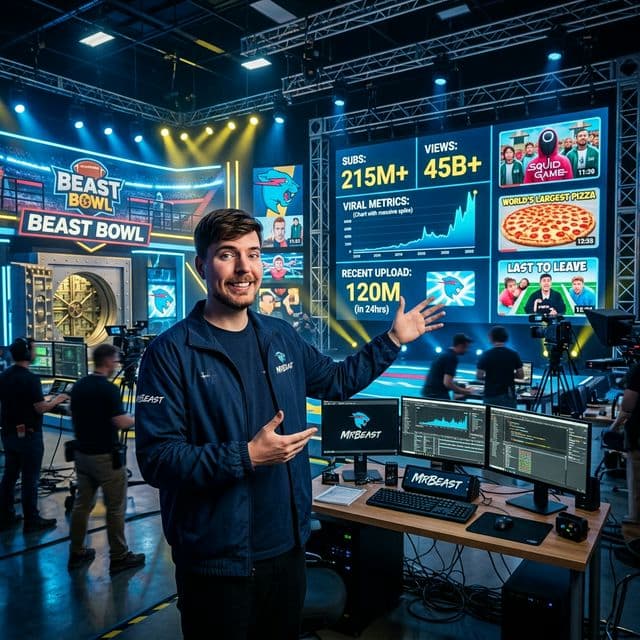
Jimmy Donaldson didn't just stumble into 450M+ subscribers. He engineered a formula that combines high-stakes spectacles with a ruthless obsession for quality.